

A sprint retrospective is supposed to be the one meeting where a Scrum team gets better. Everyone shows up, sticky notes go up on the board, a few honest comments are shared, and the session ends on time. Then the next sprint starts and the same blockers, the same handover delays and the same “we need to communicate better” come back. If that sounds familiar, you are not alone, and the problem is rarely the people in the room.
This article explains why teams attend every sprint retrospective yet keep repeating the same problems, what the warning signs look like, and a practical way to turn the meeting into something that changes how work gets done. It is written for Scrum Masters, team leads, project managers and anyone who has sat through a retro and quietly wondered whether it was worth it.
At Scrum Master Certification, we train Agile professionals across Australia, so we hear this complaint constantly. The good news is that it is fixable, and the fixes are mostly about discipline rather than clever workshop games.
What a Sprint Retrospective Is Supposed to Do
According to the official Scrum Guide, the purpose of the sprint retrospective is to plan ways to increase quality and effectiveness. The team inspects how the last sprint went, looks at people, interactions, processes, tools and its definition of done, and identifies the most helpful changes. The guide also says the most impactful improvements should be addressed as soon as possible, and may even be added to the sprint backlog for the next sprint.
Read that again, because it is where many teams slip. The sprint retrospective is not a venting session and it is not a status update. It ends with improvements that are actually carried into the next sprint. The meeting is timeboxed to a maximum of three hours for a one-month sprint, and usually shorter for shorter sprints, so there is no room for aimless discussion.
The Agile Manifesto principles make the same point in a single sentence: at regular intervals, the team reflects on how to become more effective, then tunes and adjusts its behaviour accordingly. Reflection is only half the job. The adjustment is the part that gets skipped.
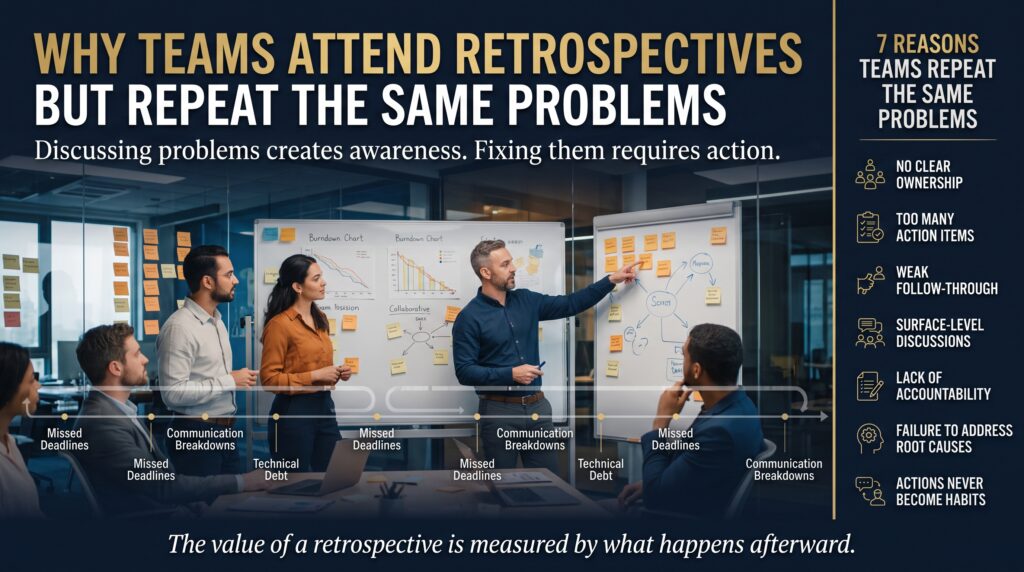
Why Teams Attend Every Sprint Retrospective but Repeat the Same Problems
In our experience, repeated problems come from a handful of predictable causes. Most teams have at least three of them at once.
1. The sprint retrospective produces discussion, not decisions
The team spends 60 minutes agreeing that something is frustrating, then runs out of time before deciding what to do about it. Everyone leaves feeling heard, which is pleasant, and nothing changes, which is the cost. A retrospective that ends without a decision is a conversation, not an improvement mechanism.
2. Action items have no owner and no date
“We should improve our test coverage” sounds like an action item, but nobody can do it on Monday morning. Without a named person, a clear outcome and a review point, the item belongs to everyone, which in practice means it belongs to no one.
3. Improvements never make it into the sprint backlog
Improvement work competes with feature work, and feature work usually wins. If the retrospective action items sit on a slide or a whiteboard photo instead of in the sprint backlog, they get squeezed out the moment pressure rises. The Scrum Guide’s suggestion to add them to the sprint backlog exists for exactly this reason.
4. The team treats symptoms instead of root causes
“Deployments are late” is a symptom. The cause might be a manual approval step, an unreliable test environment or unclear acceptance criteria. When a sprint retrospective stops at the symptom, the team patches the visible problem and the real cause quietly generates the next one.
5. People do not feel safe saying what is really going on
If the same two voices dominate, or if a manager sits in and people soften their comments, the real issues never reach the board. Teams then discuss safe topics such as tooling and meeting length, while the harder problems (unrealistic commitments, unclear priorities, tension between roles) stay untouched.
6. The biggest blockers sit outside the team
Some problems cannot be solved by the team alone: dependencies on other departments, slow procurement, shifting priorities from senior stakeholders. If the Scrum Master does not carry these upward and report back, the team learns that raising them is pointless, and stops.
7. Every retrospective looks exactly the same
Start, stop, continue every two weeks for a year is a recipe for boredom. When the format is stale, people go through the motions, and the insights get shallower with each sprint. Retro fatigue is real, and it is usually a sign that nobody can see results.
8. Nobody checks whether last sprint’s actions worked
Many teams open each sprint retrospective with a blank slate. Without a quick review of the previous actions (done, not done, did it help?) there is no feedback loop, so the team cannot tell which changes are worth repeating.
7 Signs Your Sprint Retrospective Has Become a Ritual
- The same topics appear on the board sprint after sprint.
- Action items are vague, such as “communicate more” or “be more careful”.
- Nobody can name the improvements agreed in the last sprint retrospective.
- Only a few people ever speak, and the rest wait for it to finish.
- The meeting regularly gets shortened or cancelled when the sprint is busy.
- Improvements are tracked somewhere other than the sprint backlog, if at all.
- People describe the retro as “fine” but cannot say what it has changed.
If four or more of these apply, your sprint retrospective is probably functioning as a ritual rather than a tool. That is useful information, and it points straight to what to fix first.
Ritual Sprint Retrospective vs Effective Sprint Retrospective
| Area | Ritual sprint retrospective | Effective sprint retrospective |
| Starting point | Blank board every time | Review of last sprint’s actions first |
| Focus | Many complaints, little prioritisation | One or two problems chosen and explored |
| Analysis | Stops at the symptom | Digs to the root cause |
| Outputs | Vague intentions | Specific actions with owner, outcome and review date |
| Follow-through | Lives on a slide or a photo | Sits in the sprint backlog |
| Participation | A few dominant voices | Everyone contributes, with safe formats for quieter people |
| Escalation | Team-external issues are ignored | Scrum Master raises and tracks them with stakeholders |
How to Fix Your Sprint Retrospective: A 7-Step Approach

You do not need a new tool or a day-long workshop. Try the following over the next three sprints and see what changes.
Step 1: Open with a review of last sprint’s actions
Spend the first five to ten minutes checking each previous action. Was it done? Did it help? Should it continue, change or stop? This single habit creates the feedback loop most teams are missing.
Step 2: Choose one or two problems, not ten
Collect everything on the board, then vote and focus. Teams that try to fix everything fix nothing. A small number of well-chosen improvements per sprint retrospective is far more realistic, and far more likely to stick.
Step 3: Dig for the root cause
Ask “why” until you reach something the team can actually change. The 5 Whys technique works well for this, as does a simple cause-and-effect sketch on the whiteboard. If the root cause sits outside the team, mark it as an escalation instead of an action.
Step 4: Write actions as small experiments
Good actions are specific, owned and reviewable. Compare the two columns below.
| Weak action item | Stronger version |
| Communicate better | Maya posts a short blocker summary in the team channel by 10am each day this sprint; we review whether it helped at the next retrospective. |
| Improve test coverage | Every story over 3 points includes at least one automated test in its definition of done, starting next sprint; Sam checks this at sprint review. |
| Fix deployment delays | Dev lead documents the approval steps and raises the manual sign-off with the delivery manager by Wednesday. |
Step 5: Put the actions in the sprint backlog
Treat improvement work as real work. Give it a story, an estimate if useful, and a place in the sprint. This is the clearest way to protect it from feature pressure.
Step 6: Rotate formats and facilitators
Change the sprint retrospective format every few sprints, and let different team members facilitate. Fresh formats surface fresh insights, and rotating the facilitator spreads ownership of the process.
Step 7: Escalate what the team cannot fix
The Scrum Master’s role includes removing impediments and helping the organisation understand Scrum. Keep a visible list of external blockers, raise them with the right stakeholders, and report back at each sprint retrospective. Even a “no progress yet” update keeps trust alive.
Sprint Retrospective Formats and When to Use Them
| Format | How it works | Best used when |
| Start, Stop, Continue | Three columns for new habits, habits to drop and habits to keep. | You want a quick, familiar structure. |
| 4Ls (Liked, Learned, Lacked, Longed for) | Four prompts that encourage a broader reflection. | The team needs to look beyond process complaints. |
| Sailboat | Wind (helps), anchors (slows) and rocks (risks) drawn on a boat. | You want to surface risks as well as frustrations. |
| Mad, Sad, Glad | Feelings-based prompts. | Morale is dropping or tensions are unspoken. |
| 5 Whys | Repeated “why” questions on one chosen problem. | A recurring issue needs root-cause analysis. |
A format is only a container. What matters is that the session ends with a small number of clear decisions that the team will see again next sprint.
Why the Scrum Master Role Matters for Better Retrospectives
A strong sprint retrospective depends on facilitation skill: creating safety, balancing voices, guiding the team from complaint to cause to action, and following through between sessions. These are learnable skills, and structured training helps because it gives you both the framework and the practice.
If you are building those skills, our course pages are a sensible place to start. The Agile Scrum Foundation (BCS/EXIN) course covers core Scrum knowledge, the Agile Scrum Practitioner (BCS/EXIN) course focuses on applying Scrum in practice, and the iSQI Scrum Master Pro Certification is aimed at professionals who want to strengthen the Scrum Master role itself. Check each course page for exact content, dates and delivery options, or browse the full course list.
For a wider view of Agile pathways, see the Agile training courses from Logitrain.
| If you are… | Consider | Course page |
| New to Scrum or Agile | Building a solid foundation | Agile Scrum Foundation |
| A practising team member or lead | Applying Scrum in real teams | Agile Scrum Practitioner |
| A Scrum Master wanting deeper role skills | Strengthening facilitation and coaching | iSQI Scrum Master Pro |
Sprint Retrospective Challenges Across Australian Cities
The patterns above show up in every city. What differs is the kind of organisation around you, which shapes the dependencies your team has to escalate.
| City | What often shapes retrospective topics | Where to start |
| Sydney | Large banks and consultancies often bring heavy governance and cross-team dependencies. | Scrum training in Sydney |
| Melbourne | A mix of technology, health, education and government teams often means varied ways of working. | Scrum training in Melbourne |
| Brisbane | Infrastructure, government and growing technology teams often juggle delivery with compliance. | Scrum training in Brisbane |
| Perth | Resources and energy organisations often run distributed teams with strict safety and change processes. | Scrum training in Perth |
| Adelaide | Defence, manufacturing and a growing digital sector often combine regulated and Agile work. | Scrum training in Adelaide |
| Canberra | Government agencies often face long approval chains that surface as repeated impediments. | Scrum training in Canberra |
Training is also available online across Australia. See all training locations or contact our team to discuss a group booking for your whole Scrum team.
Sprint Retrospective FAQs
What is the purpose of a sprint retrospective?
The purpose of a sprint retrospective is to plan ways to increase quality and effectiveness. The Scrum Team inspects the last sprint, identifies the most helpful changes, and commits to the improvements that matter most.
How long should a sprint retrospective be?
The Scrum Guide sets a maximum of three hours for a one-month sprint, and it is usually shorter for shorter sprints. Many teams on two-week sprints aim for around an hour, but the right length depends on the team.
Why do the same problems keep coming up in retrospectives?
Usually because actions are vague, have no owner, never reach the sprint backlog, or address symptoms instead of root causes. External blockers that nobody escalates are another common reason.
How many action items should a team take from a sprint retrospective?
Fewer than most teams think. One or two well-defined improvements per sprint are easier to complete, easier to review and more likely to change behaviour than a long list.
Who should attend the sprint retrospective?
The whole Scrum Team: the Scrum Master, the Product Owner and the Developers. Outside observers can change how openly people speak, so consider carefully who else is in the room.
Does Scrum Master training help with running better retrospectives?
Yes. Training builds facilitation, coaching and impediment-removal skills, and gives you a structured way to practise them. Explore the Agile Scrum Foundation, Agile Scrum Practitioner and iSQI Scrum Master Pro courses to see which fits your role.
Make the Next Sprint Retrospective Count
Attending retrospectives is easy. Changing what happens afterwards is the hard part, and that is where good Scrum Masters earn their keep. Review last sprint’s actions, pick one or two problems, dig for the root cause, write specific actions, and put them in the sprint backlog.
Want to build the skills to do that confidently? Browse our Scrum courses, read more on the blog, or speak to a training advisor on 1300 649 299.